


E-commerce decisions · Practical guide
WooCommerce vs Shopify: Setup, Ongoing Costs and Responsibilities

WooCommerce gives you a WordPress-based store with a hosting and maintenance arrangement to choose. Shopify provides hosted commerce through subscription plans. Compare the store you need, its complete costs and who will operate it. Neither is the right choice for every business.
A free core plugin and a monthly subscription are different starting points. Neither tells you the full cost of running your store.
Use this guide to compare one catalogue, one set of payment requirements and one cost period. It is for businesses in India and internationally. Verify current provider availability and fees for your market before committing.
WooCommerce vs Shopify: start with the operating model
The key distinction is how your store is hosted, extended and maintained. Design quality and store usability still depend on the implementation.
WooCommerce is an ecommerce platform built on WordPress. Its core and extension ecosystem let you assemble a store around your requirements. A self-hosted implementation needs hosting and a plan for updates, backups and operational support. Start with the official WooCommerce documentation.
Shopify provides a hosted commerce platform with subscription plans and an app ecosystem. A hosted platform changes infrastructure responsibilities; it does not remove responsibility for product information, account access, apps, fulfilment or customer service. Review the current Shopify setup guidance and plan details for your requirements.
Compare the store your team needs to operate
List the jobs your staff and customers must complete. Check each against the actual plan, extension or proposed custom work.
| Decision | WooCommerce | Shopify |
|---|---|---|
| Platform model | WordPress-based store; choose hosting and implementation components. | Hosted platform; select a plan and necessary apps. |
| Content and store combination | Assess fit with an existing WordPress content workflow. | Assess the platform’s content features against your publishing needs. |
| Custom requirements | Assess extensions, custom code and ongoing compatibility. | Assess plan features, apps and supported customisation boundaries. |
| Technical upkeep | Assign ownership for hosting, updates, backups and compatibility testing. | Assign ownership for accounts, apps, theme changes and operational testing. |
| Payments | Verify the selected gateway’s region, fees and integration support. | Verify regional providers, plan-related fees and eligibility. |
| Migration | Plan content, order data, media, integrations and redirects. | Plan supported imports/exports and information needing separate handling. |
The table is an original planning framework. It is not based on measured client results and does not imply equivalent features in every plan or extension.
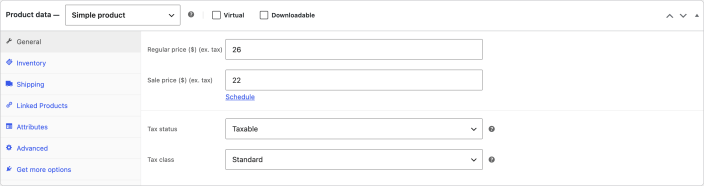
- Product typeBring a representative simple or variable product to the platform demonstration.
- Product dataConfirm price, stock and tax responsibilities rather than evaluating only the storefront.
- Use the same testAsk both WooCommerce and Shopify providers to demonstrate your actual catalogue tasks.
What affects initial setup cost?
A store with a small catalogue and standard product rules is a different brief from a store with complex variants, subscriptions or operational integrations. Specify product types, catalogue preparation, design, required pages, payments, shipping and tax configuration before comparing quotes.
Include migration work if you already have a store. Ask what data will be transferred, what needs manual handling and how important URLs will be preserved or redirected. Do not assume a theme change or import transfers every order, account or app setting correctly.
Prepare one brief for both options
- Products, variants and approximate catalogue size.
- Countries served, languages and currencies required.
- Payment providers and onboarding requirements.
- Shipping, returns and fulfilment processes.
- Inventory, accounting or CRM systems needing integration.
- Staff roles, editing requirements and support ownership.
Compare complete costs over the same period
Separate the one-time build from the cost of operating it. Then compare the same scope, currency, tax treatment and period.
Use this blank planning formula for a 12-month comparison. It is a budgeting aid, not a price estimate.
Put each expense in the worksheet once. If hosting is included in the selected platform plan, do not add it again. For percentage or usage-based fees, use the same sales assumptions for both options and identify those assumptions.
Keep any contingency separate and explain what it covers. Do not turn an uncertain estimate into a fixed quote.
What would change the shortlist?
These are illustrative business briefs, not Webinnovators client projects.
- A retailer with a standard catalogue: assess whether the required Shopify plan and apps cover its payments, shipping and staff tasks. Assess the same requirements in WooCommerce, including the maintenance arrangement.
- A publisher already using WordPress: assess whether WooCommerce fits the existing content workflow. Still compare support, payment and integration needs with the hosted alternative.
- A trader with unusual ordering rules: test the exact rules in both approaches before committing. A platform comparison cannot confirm a bespoke integration’s feasibility.
| Cost line | Questions to record |
|---|---|
| Platform or hosting | Which plan or hosting service is required? What are renewal terms and usage limits? |
| Themes and extensions/apps | Which are essential? Are charges one-time, recurring or usage-based? |
| Payments and transactions | What does the gateway charge? Does the platform apply additional fees? Which exceptions apply? |
| Maintenance and support | Who tests changes, restores failures and handles technical incidents? What is separately billed? |
| Business operations | What are fulfilment, returns, content preparation and staff costs? |
WooCommerce’s cost guidance describes expenses beyond the core software. Shopify’s plan documentation explains its subscription options. Vendor materials are useful for current components; neither is an independent proof that its platform costs less for your specific store.
Use the same period and assumptions for both estimates. Separate implementation from recurring expenses and state whether tax and payment fees are included. A total-cost worksheet is more useful than comparing incomplete headline prices.
Payments need a country-specific check
Before selecting a platform, verify that an appropriate provider can support your business location, sales markets and settlement needs. Do not assume a provider available in one country is available in India or another market. Shopify lists third-party payment provider information.
Shopify may apply third-party transaction fees depending on the plan and payment arrangement, in addition to provider charges. Eligibility and exceptions matter. Check the current transaction-fee documentation rather than using a fixed percentage from an old comparison.
Make maintenance and handover explicit
- 01 · SpecifyAgree catalogue, customer tasks and operational rules.
- 02 · VerifyCheck payments, apps and integration feasibility.
- 03 · TestReview orders, refunds, staff access and mobile checkout.
- 04 · OperateAssign upkeep, monitoring and incident responsibilities.
For WooCommerce, document update and restore procedures and how extensions will be tested. For Shopify, document accounts, permissions, app billing and ownership of theme changes. For both, retain clear access and handover records. Paying a platform subscription is not the same as having a complete business continuity plan.
WooCommerce’s official FAQ explains core software and extension considerations. Its developer documentation can help assess custom integration requirements; availability of an API does not establish the effort or reliability of a particular integration.
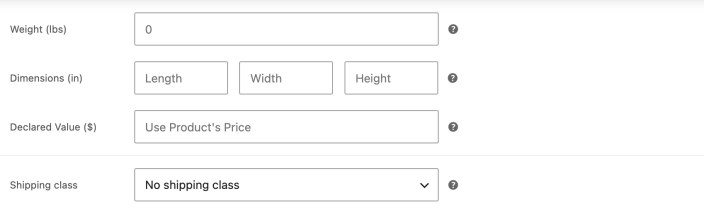
- Physical detailsCheck who supplies weights and dimensions and how they are maintained.
- Shipping classesTest your shipping rules with representative products and destinations.
- Equivalent outcomeOn either platform, verify the required delivery behaviour, integrations and recurring costs.
Test the store workflow before choosing
Ask for a demonstration of the requirements most likely to change cost or scope. Put unresolved requirements in writing.
| Journey | Check before acceptance | Owner to name |
|---|---|---|
| Find and select a product | Required variants, stock information and product details work on mobile. | Catalogue/content owner |
| Complete an order | Required payment and shipping options behave as agreed in an appropriate test environment. | Implementation and payment owner |
| Handle an exception | Clarify failed payments, cancellations, refunds and customer notifications. | Operations/support owner |
| Change a product or app | Clarify permissions, billing, testing and recovery responsibilities. | Store administrator and technical owner |
This worksheet is original editorial guidance. It does not certify a store, establish legal compliance or promise a conversion improvement.
Common comparison mistakes
- Comparing a bare platform price with a fully managed service quote.
- Assuming “hosted” means your apps, content and operations need no owner.
- Selecting an extension before checking its required features, licence and support.
- Treating a migration as an automatic transfer of every account, order and integration.
For wider store planning, use the website development hub. For broader planning context, read our website development guide. These resources support the platform decision; they do not replace a store specification.
Which option should you shortlist?
Shortlist WooCommerce when a WordPress-based content workflow and control over the implementation are important, and you have a credible maintenance plan. Shortlist Shopify when the hosted platform model and available features/apps fit your operations. Validate difficult requirements before committing to either.
Which is better for SEO or conversions?
Neither platform guarantees rankings or sales. Evaluate content, discoverability, usable product information and the actual purchase journey. Do not substitute a platform label for testing.
Can we move later?
Migration may be possible, but scope must be assessed. Data, URLs, subscriptions, integrations and customer access can need separate work.
Choose the store approach with a clear brief.
Share your catalogue, markets, payment requirements and existing systems. Compare the implementation and recurring responsibilities before agreeing scope.
Explore ecommerce developmentAlso review Shopify website development and maintenance services.
For broader planning context, see our website development guide. Use this article for the specific decision or diagnostic task discussed here.