

Google Ads Strategy for Small Businesses: Budget, Leads and Measurement

A useful Google Ads strategy starts with a defined customer, a relevant offer and a measurable enquiry journey. Decide what makes a lead qualified before choosing campaigns or increasing spend. Clicks and submitted forms are intermediate signals, not proof of profitable customer acquisition.
This guide focuses on lead-generation planning for small businesses in India and internationally. It does not prescribe a universal monthly budget or promise a number of leads. Campaign and measurement options should be checked against the current Google Ads interface and your business requirements.
Define the outcome before the campaign
Write a short qualification definition with your sales team. It might consider whether the enquiry matches your service, geography, customer type and project requirements. Those criteria are business decisions; do not automatically mark every contact as qualified.
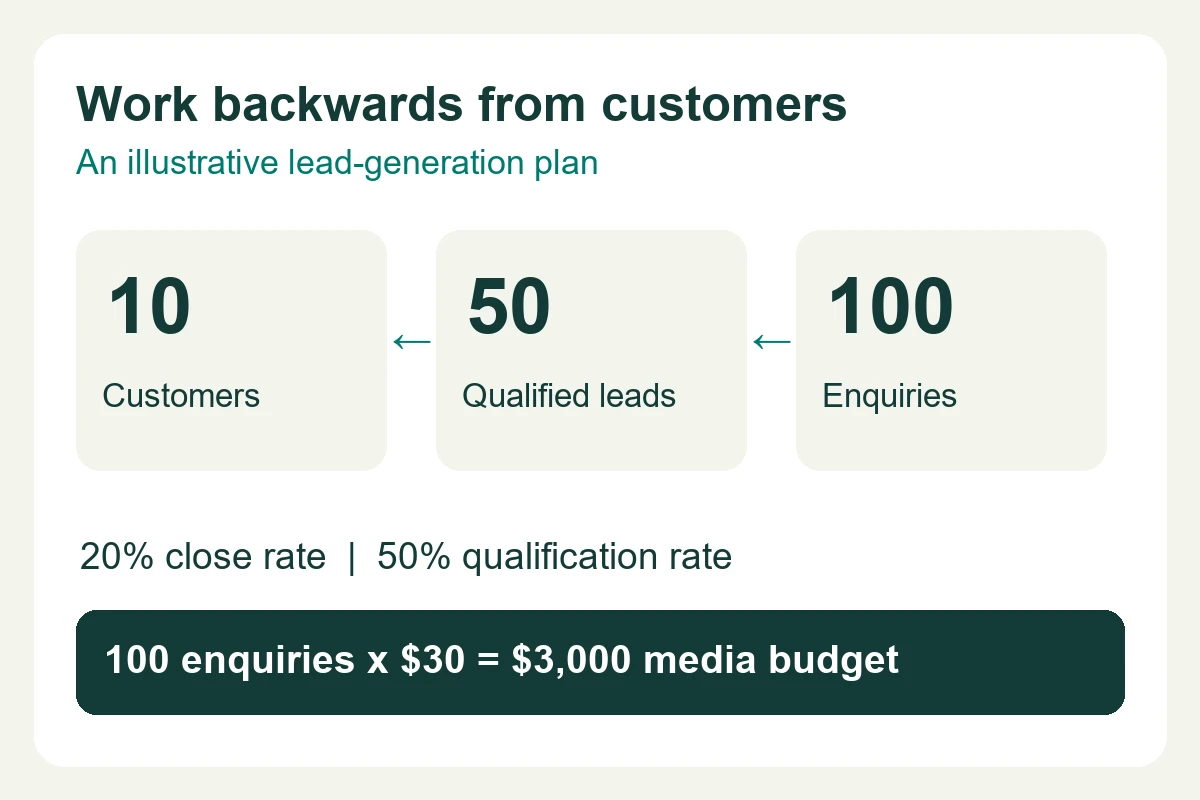
Keep a distinction between enquiry, qualified enquiry and customer. Google documents qualified and converted lead goals for measuring stages after the initial contact. Use those stages only when you have a dependable process for recording them.
- 01 · Relevant visitA searcher reaches a page that matches the offer.
- 02 · Accepted enquiryThe form succeeds or a meaningful contact occurs.
- 03 · Qualified enquiryThe team confirms the lead meets agreed criteria.
- 04 · Customer outcomeRecord the outcome and value where reliably available.
This is a proposed reporting model, not a claim that all these stages are currently tracked on the Webinnovators site. A WhatsApp click cannot establish whether a conversation happened or whether it became a qualified project.
Choose the audience and intent you can serve
Start with the products or services you actually want to sell. Group campaigns around materially different offers or markets when separate budgets and landing pages are useful. Avoid treating every broad industry search as a buying signal.
For a local service, review geographic targeting and whether the presence or interest setting matches your business. For a national or international campaign, check delivery capability, language and sales follow-up. Google explains that location targeting uses signals and is not perfectly accurate.
Review search terms to understand the queries that are producing visits. Negative keywords can help exclude irrelevant intent, but overly broad exclusions can block useful enquiries. Use Google’s negative-keyword guidance as a starting point, then assess actual relevance.
Separate the costs in your budget
| Cost category | What to clarify | Who confirms it |
|---|---|---|
| Advertising media | Spend paid to the advertising platform; campaign allocation and billing limits. | Account owner and campaign manager. |
| Campaign setup and management | Scope, reporting, optimisation and agreed commercial fees. | Your provider’s written proposal. |
| Landing page and creative | Required pages, copy, visuals and testing. | Your delivery team or provider. |
| Measurement and sales operations | Tracking implementation, CRM work and lead follow-up. | Marketing, technical and sales owners. |
Google uses average daily budgets. For most campaigns, daily spending limits can be twice the average daily budget and monthly limits are generally based on 30.4 times that budget. Exceptions and changes require care; read Google’s budget and spending-limit documentation for your campaign.
Arithmetic example only: ₹30,400 divided by 30.4 is ₹1,000. This illustrates the average daily-budget calculation. It is not a recommended spend, a Webinnovators price or an estimate of leads. Provider fees and other project costs are separate.
Decide how much evidence you need before expanding. If a budget is too small to learn about multiple offers at once, prioritise the most relevant one rather than dividing it across many unrelated campaigns.
Make the landing page match the promise
A visitor should quickly understand the offer, suitability, important scope and next step. The page should support the ad’s message rather than forcing a visitor to search a general homepage. Google’s landing-page guidance connects relevance and usefulness with the campaign experience.
Use genuine evidence, straightforward form labels and clear contact options. Check the page on mobile, including validation and the success message. Do not add fake urgency, invented testimonials or claims your team cannot deliver.
If a dedicated page is needed, assess landing page development. If the current site is difficult to use, review website redesign before sending more paid traffic to it.
Measure successful contact, then qualification
Count a lead event when the contact has actually been accepted, not merely when someone presses Submit. Separate clicks on phone, email and WhatsApp from completed conversations. Check for duplicate events and test the journey while logged out where administrator traffic is excluded.
Google Analytics lists recommended lead events in its GA4 event documentation. An event name alone does not prove correct implementation. Reconcile collected events with accepted enquiries, and record qualification in the CRM or an agreed lead register.
If offline outcomes are sent back to Google Ads, use a currently supported route and appropriate privacy notices, permissions and consent. Google’s offline conversion documentation explains the available approach. Do not upload sensitive lead details simply because tracking technology permits it.
Report the metrics with their definitions
- Cost per enquiry: agreed spend divided by accepted enquiries. State whether “spend” means media only or total campaign cost.
- Cost per qualified enquiry: the same cost basis divided by leads meeting your recorded criteria.
- Qualification rate: qualified enquiries divided by accepted enquiries for a defined period and cohort.
- Customer outcome: record sales and value where attribution and follow-up are reliable.
When there are no qualified enquiries, a finite cost per qualified enquiry cannot be calculated. ROAS uses attributed revenue relative to advertising spend; it is not the same as profit. These definitions are reporting aids, not performance benchmarks.
Review the funnel before increasing spend
If visits are irrelevant, review targeting and query relevance. If relevant visitors struggle to contact you, inspect the page and form. If accepted enquiries are unsuitable, assess the offer, qualification questions and campaign intent. If qualified leads do not progress, review response handling and sales outcomes. More spend does not by itself solve these different problems.
For call-focused campaigns, note Google’s transition from call-only ads to responsive search ads: new call-only ad creation was removed in February 2026, with existing call-only ads scheduled to stop receiving impressions in February 2027. Check current account options before following older tutorials.
Plan advertising around enquiries you can evaluate.
Share your offer, target markets, existing landing page and how your team handles leads. Agree the scope and measurement responsibilities before launching or expanding.
Explore SEM servicesFor a more detailed review of the page after an ad click, see our guide to the website enquiry journey. This article focuses on campaign planning, budget and lead qualification.